
7 Must Have Wordpress Plugins
This list contains my top 7 Must Have Wordpress Plugins.
Because I’m a visual learner, I’ve included screenshots of each plugin to help you get a better understanding of how to use each one. Experience is the best teacher which is how I have learned which plugin’s work best for my blog. I hope you will find this information helpful.
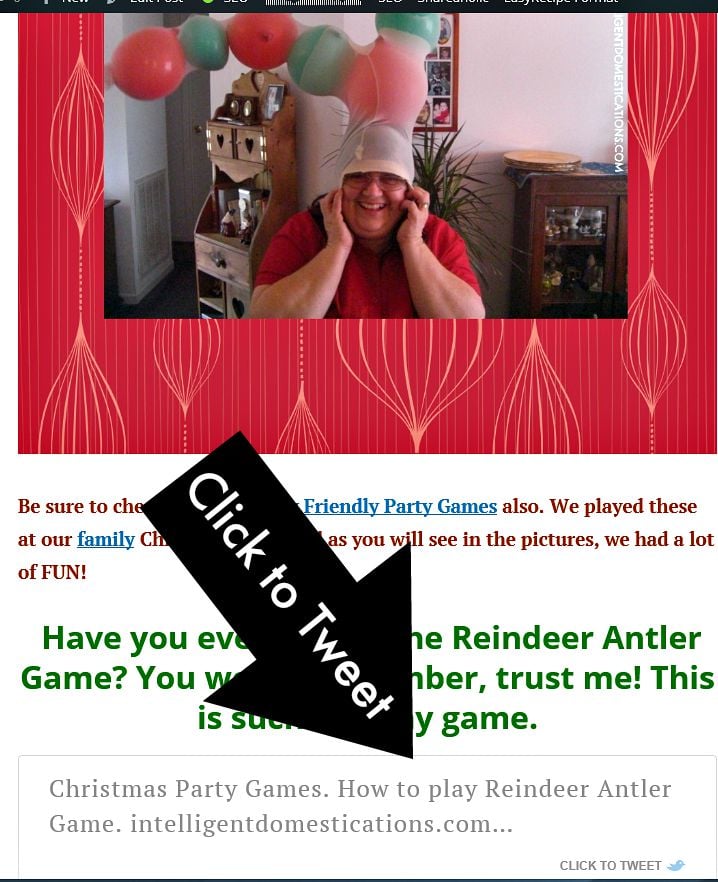
1.Click to Tweet by CoSchedule
Click to Tweet is great for the right kind of post. It isn’t necessarily a tool you will wish to use for every single post you write. It’s great for blog parties, giveaway’s and current events type information. Most readers are willing to help you get the word out for current events.
You may wish to update a post and add the Click to Tweet feature once you see that a particular posts is very popular. My Christmas Party Games post was one of the first I wrote when I began my blog. It has been very popular from the beginning. I have updated it a couple of times including adding in the Click to Tweet link.
2. Easy Recipe
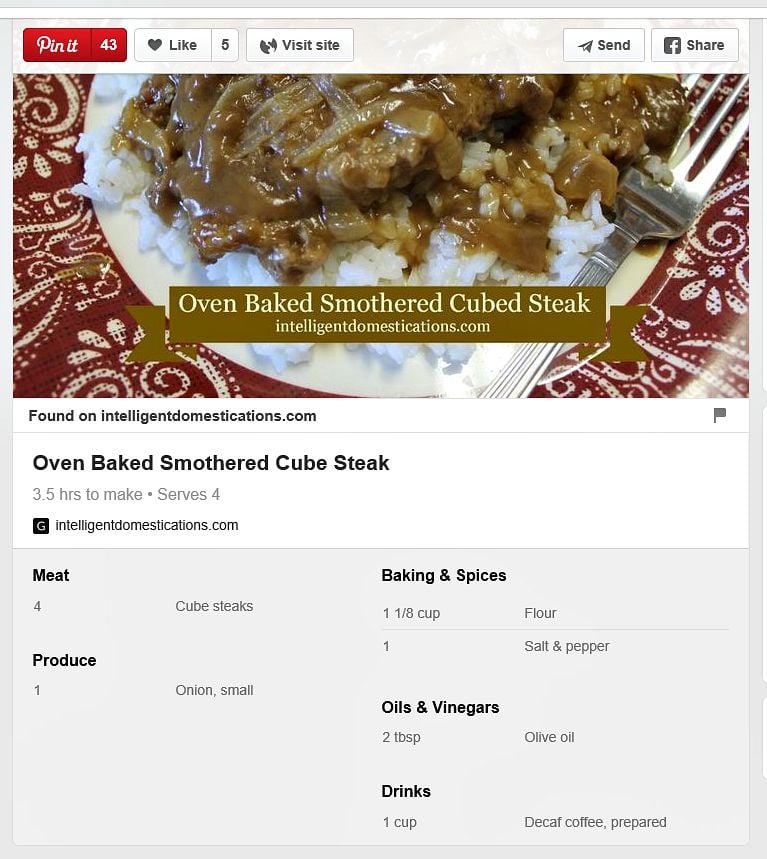
Easy Recipe will do two things to make your blogging life better!
- Allow you to be able to have Rich Pins. (Go HERE for 3 Easy Steps to Add Rich Pins, a very simple and easy to understand tutorial)
2. Add a more professional looking printable recipe to your blog post.
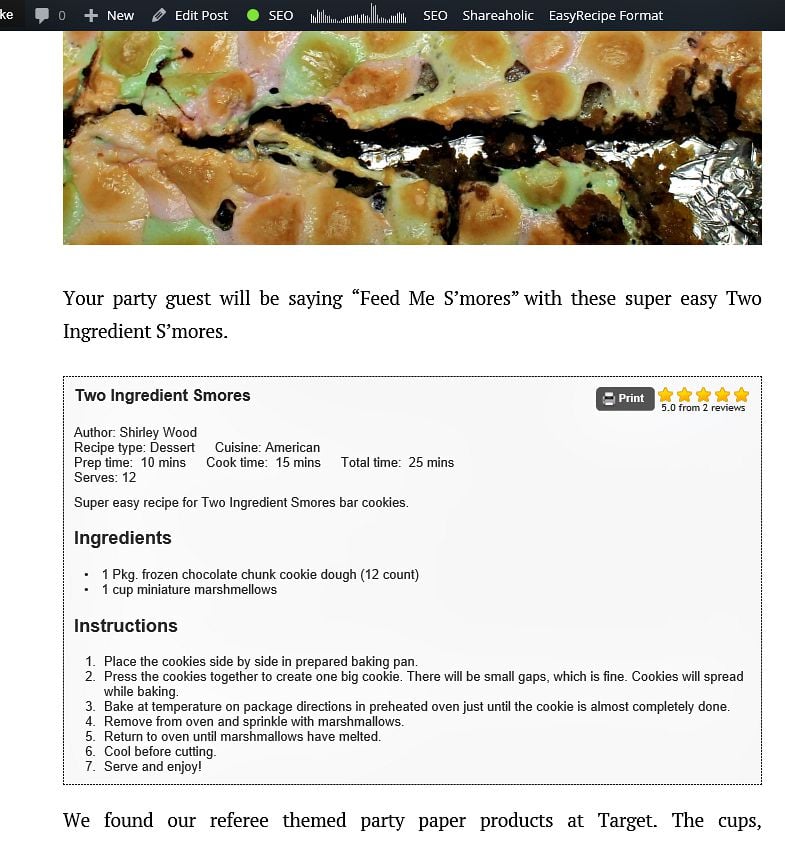
I use the free version of Easy Recipe (Free is always good!) The paid version will allow you to include a picture inside the printable area.
3.Yoast SEO
SEO means Search Engine Optimization
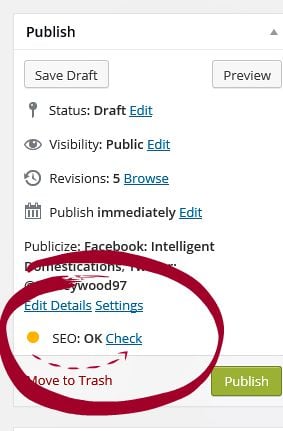
My favorite thing about Yoast is the SEO ‘coaching’. YOAST will give you the ‘green light’ when you are SEO ready. Click on ‘Check’ (as shown in below screenshot) to learn which corrections you need to make if you have a yellow or gray light.
Clicking on ‘Check’ will take you to the Page Analysis with a list of suggestions and tips to make your post Search Engine Optimal.
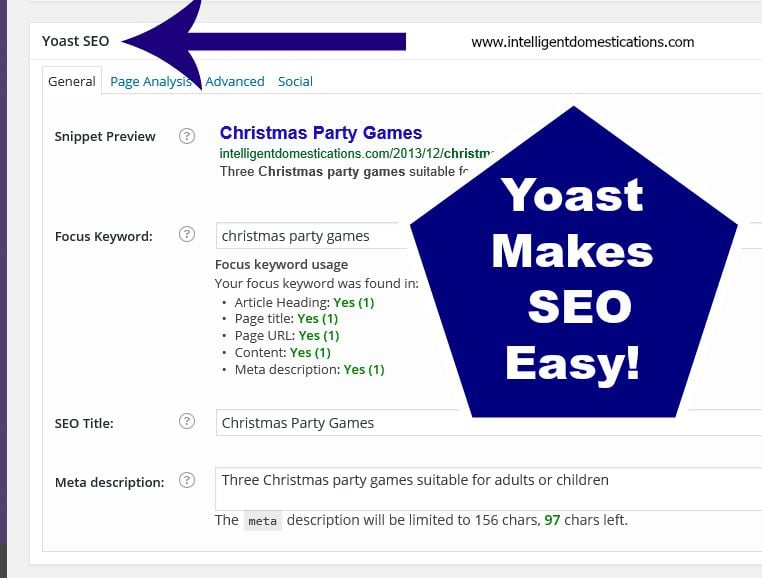
Once you have all green Yes’s (as seen in screenshot below) and the green light on your Dashboard Edit Post, you are good to go!
Enjoy organic visitors who are able to find your site when they enter matching search terms into their search engine.
4.Comment Luv
Bloggers love comments! I used to comment on blogs long before I became a blogger myself.
If I had seen other interesting blog title links in the comments, I would definitely click on them. I frequently visit a blog from the Comment Luv link. Don’t you?
TIP: If you have the Comment Luv plugin on your blog but you are not seeing those links show up in your comments, please go fix the problem. It’s probably very simple and even has a quick fix from the Plugin owners.

5. Jetpack by Wordpress
My Favorite Thing About The Jetpack Plugin for Wordpress is Site Stats.
You will find a comprehensive list of Site Stats for up to one year. This is excellent information to help you determine your strategies going forward.
How to get to get there:
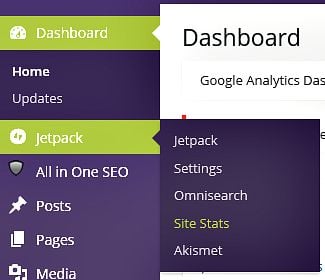
Highlight ‘Jetpack’ in your Dashboard and then click on ‘Site Stats’
You will find
- Bar graph with stats for Days, Weeks & Months
- Referrers to help you see which social media sites are performing best for your blog
- All of your Top Posts & Pages (now you know what your readers are interested in)
- Search Engine Terms being used to find your blog posts
- The links being Clicked on your blog
6. Revive Old Post by Themeisle
Revive Old Post does a great job of social media sharing of your older posts. You choose which posts will be shared and how often. The free version includes Facebook and Twitter. I stick with the free version. The great thing about Revive Old Post is that you set it and you’re done. Other social scheduling sites like Hootsuite are wonderful but you do have to go set the schedules often.
7. Shareaholic
Shareaholic offers an array of features we all need on our blog. You will get floating social share buttons, the Pin it button over each and every image, nice sized and attractive related post links, social follow buttons and even affiliate links.
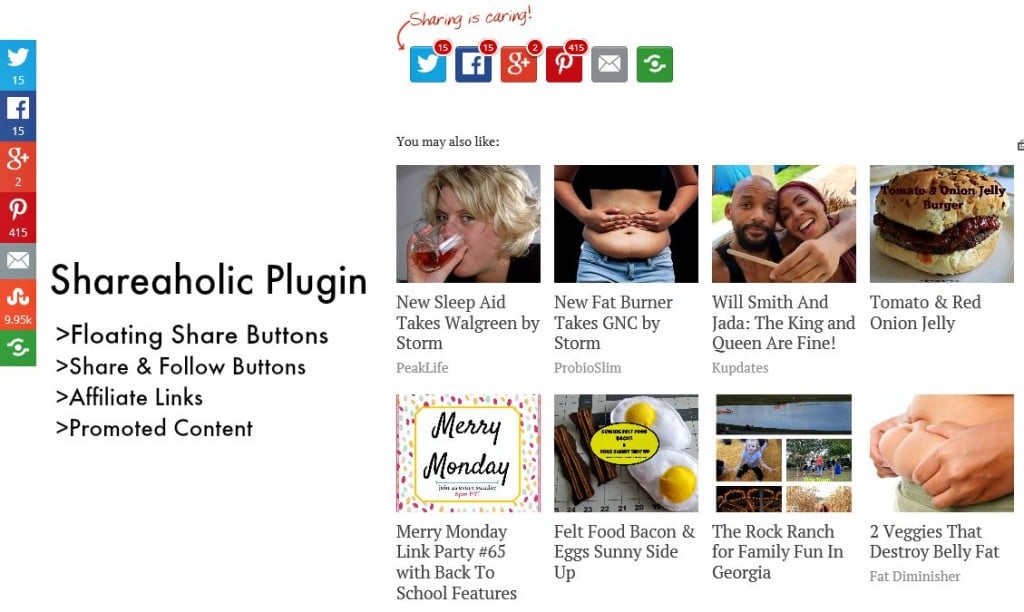
The down side of Shareaholic for me is that I’d like to select the Promoted Content myself.
[Tweet “7 Must Have Wordpress Plugins for Bloggers #wordpressplugins #easyseo”]
There you have it! My top 7 Must Have Wordpress Plugins.
- Click to Tweet by CoSchedule
- Easy Recipe
- Yoast SEO
- Comment Luv
- Jetpack by WordPress
- Revive Old Post by Themeisle
- Shareaholic
What are your Must Have plugins? We’d all like to know!
PIN THIS POST HERE
YOU MAY ALSO LIKE
What Is Trending On Your Blog?

How To Add The Fahrenheit Symbol To Your Recipes

Fall Fairs & Festivals in Georgia



I already have CommentLuv, but some of these others look great! I’ll definitely have to check into them.
Great list of plugins, I use or have used many of them.
One of my favorite must have plugins is Backup Buddy. It runs a complete backup of my site daily and sends me a zip file.
I use commentluv and shareaholic. Love those plugins! I sometimes put recipes on my blog. I will have to check out those recipe plugins!
What a great list! I use quite a few of these but I am definitely going to be checking out Revive Old Posts… I like the idea of not having to think about it when it comes to sharing my older content. Thanks for sharing!
I use a couple of these and they help a lot! I really want to try the recipe one and the tweet one! Thanks!
Oh my! This is super! Thank u. I have Yoast, but the others are definitely worth adding on. Saved to my Pocket 🙂
Awesome post! I love Yoast and my dashboard is purple as well 🙂
I have been eyeing a recipe plug in for the longest time but has not chosen nor installed it yet. I am planning of making more recipes in the future and sharing them so this will be very helpful
I have not made the jump to wordpress yet, but these plugins look so useful. I love the tweets functions. I always use them in posts I am reading.
These plug-ins look really helpful. 🙂
Great list! I especially love Comment Luv. It helps making commenting so much easier and more rewarding. If a blog makes it difficult to comment, I usually won’t. I’ll have to check out the Recipe plugin. I don’t do too many, but it would be nice to make them look professional!
Nice list! Two of my must haves are a spam bot blocker and WordFence. I was amazed at how many spam bots left comments on my site and love not having to deal with them.
I’ve been thinking about adding Shareaholic. I’m going to have to check it out.
Thanks for sharing the plug-ins. As a new blogger, I’m always searching and learning and your post definitely hit the spot!!!
I’m glad to know that I use them all with the exception of the revive old posts one. I am going to check it out right now. Thanks for sharing these. I pinned it as well.
I’m definitely a fan of the comment luv. I tend to comment on websites more that have that feature. It is awesome to see what other people have been writing about as I scroll through the comments.
This is a fabulous post! I just discovered comment luv. I really like your site. I’ll definitely be stopping by more often.
This is a great list. I use most of these. I have Jet Pack but have yet to start using it. I better get on it!
thank you sooooooooo much for this!!!
i do have some of these but i’m getting ready to install the rest! thank you!!!
Thank you for this post. I am new to blogging and I am going to go and get all this widgets. Especially Yoast SEO. Thank you
Thanks for sharing your list of plug-ins. I love CommentLuv, I think it’s a wonderful way to encourage others to comment and also encourages other readers to click around and visit other blogs.
I’ve heard a lot of positive things about these widgets. I hope that day Blogger will get some of these or similar versions since I’m not really interested in switching my current blog to WP any time soon!
I was just asking about this in a group I belong to …there are so many plugins, it’s hard to know which ones to use…thank you for sharing
SEO by Yoast helped me get on page one of Google with one of my posts. It’s been one of the greatest achievements with my blog thus far. I wouldn’t recommend any other SEO plugin. I’ve never heard of Revive Old Post! I”ll have to investigate that one. Thanks for the great list of plugins!
This is great for whenever I do make the switch from Blogger to WP! I’ve been on blogger for 5 1/2 years now and I’m scared to death to switch!! It’s still on my bucket list though… when I do, I’ll definitely turn to this list. I love the click to tweet plugin!
I’m fairly new to blogging so I haven’t made use of very many plug ins yet. This is a great list! I’m definitely going to check out Easy Recipe and Coment Luv very soon! Thanks for sharing!
I am always looking for great plugins. Thanks for sharing these. One of my favorites are Comment Reply Notification. I always like getting an email when someone replies to my comment so I like to return the favor.
Awesome, I just learned something new today – #2 #3 and #6- this is a great post. I am going to check out the republish plugin.
To be frank, I have not used any plugins. But want to make use of one at the earliest. Thanks for introducing …. 🙂
Thanks so much. I can’t wait to try Yoast SEO!
My must-have plugin is WordFence Security. I have hundreds of hack-attempts each week, and I have never had anyone break through (it helps that I have a great admin name and crazy-long password!). I also use Akismet- it rid me of the 100’s of comment spam that I was getting. I am not sure if other people have the security issues that I have- in fact I would really like to know if other people do, or if this is because of my target audience. Do you have spam and hack problems?
Akismet does a great job of keeping the spam at bay. I haven’t needed any further protection beyond Akismet thus far.
What a great list, some of these I was already familiar with but there are a few I’ll be checking out!
Thank you! Thank you! Thank you! I am a new blogger and have been hunting for the best must have plugins and here they are. I have just bookmarked this post. Thanks again
Great list of plugins. I love Yoast, Shareaholic and Jetpack. I also use a different Tweeting plugin that I love. I will be looking into the Easy Recipe. I have been happy with Recipe Card, but I haven’t started doing Rich Pins yet…so it may be worth it to switch! I love to hear what works for other bloggers!
I saved this to dive into and add to my site…THANK YOU so much!
This looks like an amazing list! I myself am still on Blogger because I’m too chicken to make the change. (I didn’t know that I would still be blogging when I started back in 2011, and Blogger was the only one I knew of at the time.) But I do use Wordpress for some of the bloggers I work with through my VA business. I’ll have to make sure my clients are familiar with all of these. Thanks!
Great ideas here! My blog is not currently on wordpress, but if I ever move it over I’m happy to have learned a thing or two 😉
Thanks for this, it’s very interesting and very useful. I don’t *yet* have a self-hosted blog, and so plugins are quite new to me. I want to migrate my content eventually to one where I can use plugins, so I will definitely be back to look over these again. I would especially like the recipe one! Thank you!
I love the Revive Old Posts plugin, and I’ve got a couple of these others. I’m going to go check out the other ones you’ve mentioned. Thanks so much for this great blogging resource!
I swear by Yoast! And I just discovered the click to Tweet. I also really like the Instagram and Pinterest Slider widgets. Thanks for sharing! I’m going to check out the Revive Old Post plugin!
Thanks for sharing this post. plugins are so helpful and I have most of your pick . This post is featured this week on #wednesdayswisdom, so well done
Thanks for these! I just enabled my rich pins and got a click to tweet plugin on my site. Appreciate the suggestions!
Thanks for linking up to This is How We Roll linky party!
Thanks, it’s so useful! I’ll have a deeper look at #3 and 7, I have no idea about SEO…
I’ll have to look into Revive Old Post! I am so bad at scheduling out content to share, mine or others. This would be a good way to get my older stuff some new life!
These are 7 great plugins which you have shared with us at #WednesdaysWisdom. I didn’t know about Shareoholic and Revive Old Post which I am definitely going to try. Thanks for linking up with such an informative post. Would also love to see you at #anythinggoes linkup on Mondays.
Great post! You are so talented. Thanks for sharing this at our party. Pinned and tweeted. I hope to see you on Monday at 7 pm, so we get to party with you again! Lou Lou Girls
I’m pretty sure I use about 5 of these currently. 🙂
Thanks for joining Cooking and Crafting with J & J!
I don’t understand what plug-ins are. But I definitely would like to have comment luv!
Great list. I haven’t heard of #6. I need to check that out. With so many old posts, it would be great to get some of them out there again. I’d love for you to link up to Tips and Tricks on Fearlessly Creative Mammas. It started at 7pm mt tonight.